Open the installer - signed & notarized by Apple for Keyweaver Limited
3
Open Keyweaver Manager and click Install on any plugin
4
Fully quit and reopen After Effects or Premiere Pro → Window → Extensions (or Extensions Legacy) → Keyweaver - …
Notarized by AppleNo account to tryGuest trials in AI panelsPublisher: Keyweaver Limited
Signed and notarized by Apple. Publisher: Keyweaver Limited. If Gatekeeper still prompts, open System Settings → Privacy & Security and allow the install.
Signed · Keyweaver Ltd
Keyweaver Installer for Windows
Installs Keyweaver Manager · then install any plugin from the catalog · extract and double-click Install Keyweaver Manager
Extract, then double-click Install Keyweaver Manager. A small installer window appears — no black terminal
3
Open Keyweaver Manager and click Install on any plugin
4
Fully quit and reopen After Effects or Premiere Pro → Window → Extensions (or Extensions Legacy) → your plugin (Cuemark and Ludo are AE-only; Trillian, Tambourine, and Superconductor have AE and Premiere builds)
Signed by Keyweaver LtdNo account to tryGuest trials in AI panelsNo admin password
Extract the zip, double-click Install-Cuemark.cmd, click Run if Windows asks, then restart After Effects.
Manual copy steps are in README.txt if you prefer not to run the installer. For Superconductor, Trillian, Tambourine, or Ludo on Windows, use Keyweaver Manager.
Extract the zip, then double-click Install Keyweaver Manager. Manager opens when install finishes. Pick the After Effects or Premiere Pro tab, click Install, then fully quit and reopen that host. On newer AE builds, look under Window → Extensions (Legacy) if Extensions is empty.
Windows may say "publisher could not be verified." That is normal for the zip installer. Click Run. The zip installs to your user folder only - no admin rights.
Official Keyweaver install. Extract the zip and double-click Install Keyweaver Manager — a small branded window installs Manager (signed from keyweaver.io) and opens it. Optional Setup wizard is still available below if you prefer it.
After Effects & Premiere Pro 2022+
Windows 10 / macOS 12+
No account needed to try
That's it
Four steps, then you're in AE or Premiere
Keyweaver Installer sets up Keyweaver Manager on your PC. Manager has After Effects and Premiere Pro tabs: five AE plugins (including Cuemark) and three Premiere companions (Trillian, Tambourine, Superconductor).
1
Extract and run Keyweaver Installer
Open the zip, then double-click Install Keyweaver Manager. No admin password — a small installer window appears.
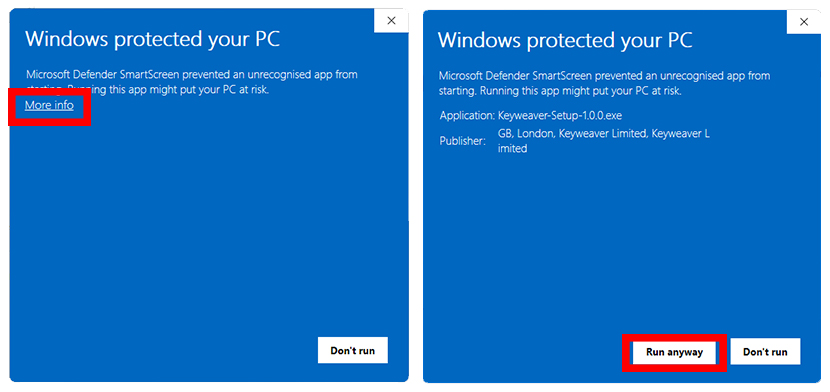
If you see Windows protected your PC, click More info → Run anyway. Check the publisher is Keyweaver Ltd - that means you have the real installer.
2
Open Keyweaver Manager
After setup, open Keyweaver Manager from the Start Menu (or the desktop shortcut). Choose the After Effects or Premiere Pro tab at the top of the catalog.
3
Install a plugin
Click Install on the plugin you want. AE tab: Cuemark, Trillian, Tambourine, Superconductor, Ludo. Premiere tab: Trillian, Tambourine, Superconductor. Manager downloads the package and installs the panel to your user AppData folder.
4
Reopen AE or Premiere
Fully quit After Effects or Premiere Pro if it was open, then launch it again. Extensions only load on startup.
5
Open the panel
Window → Extensions → your Keyweaver plugin
AI panels include guest trials. Ludo is free with no credits.
Installation guide
Installing on Windows
1
Download and extract
Download Cuemark-Install-win-v1.0.2.zip, right-click → Extract All, and open the folder.
2
Run Install-Cuemark.cmd
Double-click Install-Cuemark.cmd. It copies Cuemark into your extensions folder and configures After Effects automatically.
If Windows shows publisher could not be verified, click Run. Prefer not to run a script? Use the manual steps in README.txt instead.
3
Restart After Effects
Fully quit After Effects if it was open, then launch it again. Extensions only load on startup.
4
Open a plugin
Go to:
Window → Extensions → your Keyweaver plugin
AI panels include guest trials. Sign up free for shared credits across the suite. Ludo needs no credits.
Manual install (advanced)
Copy com.captioncraft.panel to %AppData%\Adobe\CEP\extensions\ and set PlayerDebugMode to 1 under HKCU\Software\Adobe\CSXS.12. The installer does this automatically.
Installation guide
Installing on macOS
Same flow as Windows: install Keyweaver Manager, pick the After Effects or Premiere Pro tab, then install from the catalog.
1
Install Keyweaver Manager
Download Keyweaver-Manager-1.0.0.pkg, open it, and complete the installer. Manager appears in Applications.
2
Install plugins from the catalog
Open Keyweaver Manager, choose the After Effects or Premiere Pro tab, then click Install. Manager downloads the package, verifies it, and installs the panel into your Adobe CEP extensions folder.
3
Restart AE or Premiere
Fully quit After Effects or Premiere Pro if it was open, then launch it again.
4
Open a plugin
Go to:
Window → Extensions → your Keyweaver plugin
AI panels include guest trials. Sign up free for shared credits across the suite. Ludo needs no credits.
Compatibility
Supported versions
Host app
Windows
macOS
After Effects 2022-2025
✓ Supported
✓ Supported
Premiere Pro 2022-2025
✓ Supported
✓ Supported
2020 and earlier
Not supported
Not supported
After Effects catalog: Cuemark, Trillian, Tambourine, Superconductor, Ludo. Premiere Pro catalog: Trillian, Tambourine, Superconductor. Cuemark is After Effects only.
Chrome or Edge blocked the download (“dangerous” / uncommon file)
Use the recommended Manager install zip: extract it, then double-click Install Keyweaver Manager (no Setup.exe inside — Chrome-safe).
If you downloaded the bare Keyweaver-Setup.exe and Chrome blocked it: open Downloads (Ctrl+J) → ⋯ → Keep / Download anyway, or switch back to the Manager zip from this page.
Cuemark only: Download the Cuemark zip.
Windows blocked the installer or showed a security warning
Windows shows Windows protected your PC for many new apps, even when they are properly signed. Keyweaver-Setup is signed by Keyweaver Ltd. Click More info → Run anyway to continue. If the publisher name does not say Keyweaver Ltd, do not run it - re-download from this page. The warning usually fades after enough people have installed the same build. If Chrome blocked the file before it saved, see the FAQ above.
Keyweaver Manager says “virus or potentially unwanted software”
That message is from Windows Security, not from Keyweaver. Manager is signed by Keyweaver Ltd; some PCs still flag a new build once.
Open Windows Security → Virus & threat protection → Protection history, find Keyweaver-Manager.exe, then Actions → Allow / Restore.
Close Manager fully and reopen from the Start Menu so it can sync the latest signed build.
If it still fails, reinstall from this download page (Setup stays signed; Manager updates on next launch).
The panel doesn't appear in Window → Extensions
On Windows or macOS, open Keyweaver Manager, select the matching After Effects or Premiere Pro tab, and click Install again. Then fully quit and relaunch that host - Adobe apps do not hot-reload extensions.
I see a blank white panel
Reinstall from Keyweaver Manager, then fully restart After Effects or Premiere Pro. If the panel still shows blank, right-click inside it and choose Inspect - check the console for errors.
After Effects says the extension is not compatible
Keyweaver plugins require After Effects or Premiere Pro 2022 or later (depending on which catalog product you install). Check your version under Help → About and update if needed.
Cuemark transcription fails or returns an error
Check that you're signed in (or using guest trial credits) and have Keyweaver Credits available. Each Cuemark generate is limited to 15 minutes of footage. Audio uploads are capped at 4 MB; Cuemark extracts audio from video automatically. If extraction fails, export audio-only (MP3/WAV under 4 MB) and generate again. See Cuemark help.
Can I use Keyweaver on multiple computers?
Yes. Install any plugin on as many machines as you like. Credits and subscription are tied to your Keyweaver account, not a specific device. Sign in on each machine and your balance follows you.
macOS blocked the Manager installer
The Mac Manager package is signed and notarized by Apple for Keyweaver Limited. If Gatekeeper still blocks it, open System Settings → Privacy & Security, find the blocked app message, and choose Open Anyway, then try the .pkg again.
You chose the optional Keyweaver-Setup.exe wizard. It is signed by Keyweaver Ltd, but Chrome often blocks that file. Prefer the main Manager zip on the download page when possible.
If Chrome says “This file is dangerous”
Open Downloads (Ctrl+J)
On the blocked file, open ⋯ → Keep / Download anyway
Then run Setup. If the blue SmartScreen window appears, continue below